
This feature is only available for vSRO Files. Please inquire for information regarding vSRO-R or other R-Files.
This system is an integrated voting system that allows players to vote via privateservers.org, and automatically awards the user a reward (silk) upon verification.
The user clicks the Vote button on their own site, is redirected to a special voting interface, and then securely transferred to privateservers.org.
After the voting process is complete, the system verifies the returned data (token, IP, timestamp, secret key) and, if valid, credits the reward to the user's account.
Otherwise, the request is rejected. The system is also protected by re-voting periods, security checks, and logging mechanisms.
To begin the process, first download the necessary files using the button below. After updating your website and database, proceed more easily with the commands below. The crucial part here is seamlessly integrating the vote system into your website and database.
From this point on, thanks to the full automation of our infrastructure, you will have unlimited testing rights with your voteadmin accounts.
Thanks to our advanced system that doesn't require any firewall IP address, we've developed a fully automated, multi-layered security system that prioritizes your privacy and security. Don't forget to add VoteSystem, which we've explained simply but comprehensively.
The goal of this system is to add a seemingly simple voting system to a website, but one that works behind the scenes with a database and security verification. The user adds a Vote[button] to their site's header.php file. Clicking this button takes the user to our prepared vote.php page located in the site's root folder. Therefore, the first step of the system is to provide access to a custom voting interface via the header.
Code to add a button to your header.php file
<a href="<?php echo htmlspecialchars(vsroBasePath(), ENT_QUOTES, 'UTF-8'); ?>">Vote</a>
You may need to modify the vsroBasePath() code here to suit your needs.
Place this code in the root folder of your file, wwwroot update SQL Proc and TabsOne thing you need to pay attention to is that you must code the .php, .css, .js, and .sql files we provide in a way that suits your own infrastructure; otherwise, you will encounter errors. We have set up a system that gives you unlimited voting rights so you can easily run your tests.
The SiteID shown here is the value written on the banner you added. Add this data to your sro_vote_provider.SiteID tables and
sro_vote_site_map.site_id tables, which we will show you shortly,and share your SiteID and your game's domain name with us by
submitting a support request or emailing [email protected]
While your website is in the testing phase, use the following VoteAdmin accounts to edit your SiteID as shown in the image, just like you would in your own VoteAdmin account.
username: voteadmin |2|3|4|5|6|7|8|9|10
password: 123456
SiteID: Visible and fixed in the account panel; it cannot be changed. You will apply this data to two different databases, as shown in the photo below.
shared_secret: This part is the data from the table you added to SQL. Define this in your own table, then, for the voteadmin account you are using, enter your database key into the account field on the website and update it. This will update your actual key address in the privateservers.org database.
shared_secret: Do not share your key, generated using random values, with anyone. Complete the testing phase with our database using this key. After the votesystem is successfully integrated, you must notify us of this key via our Contact or support email address.
In the database, this is the sro_vote_env_user.SRO_VOTE_SHARD_SECRET field. Define this in your own table, then enter and update your database key for your voteadmin account in the account field on the website. This will update your actual key address in the privateservers.org database.
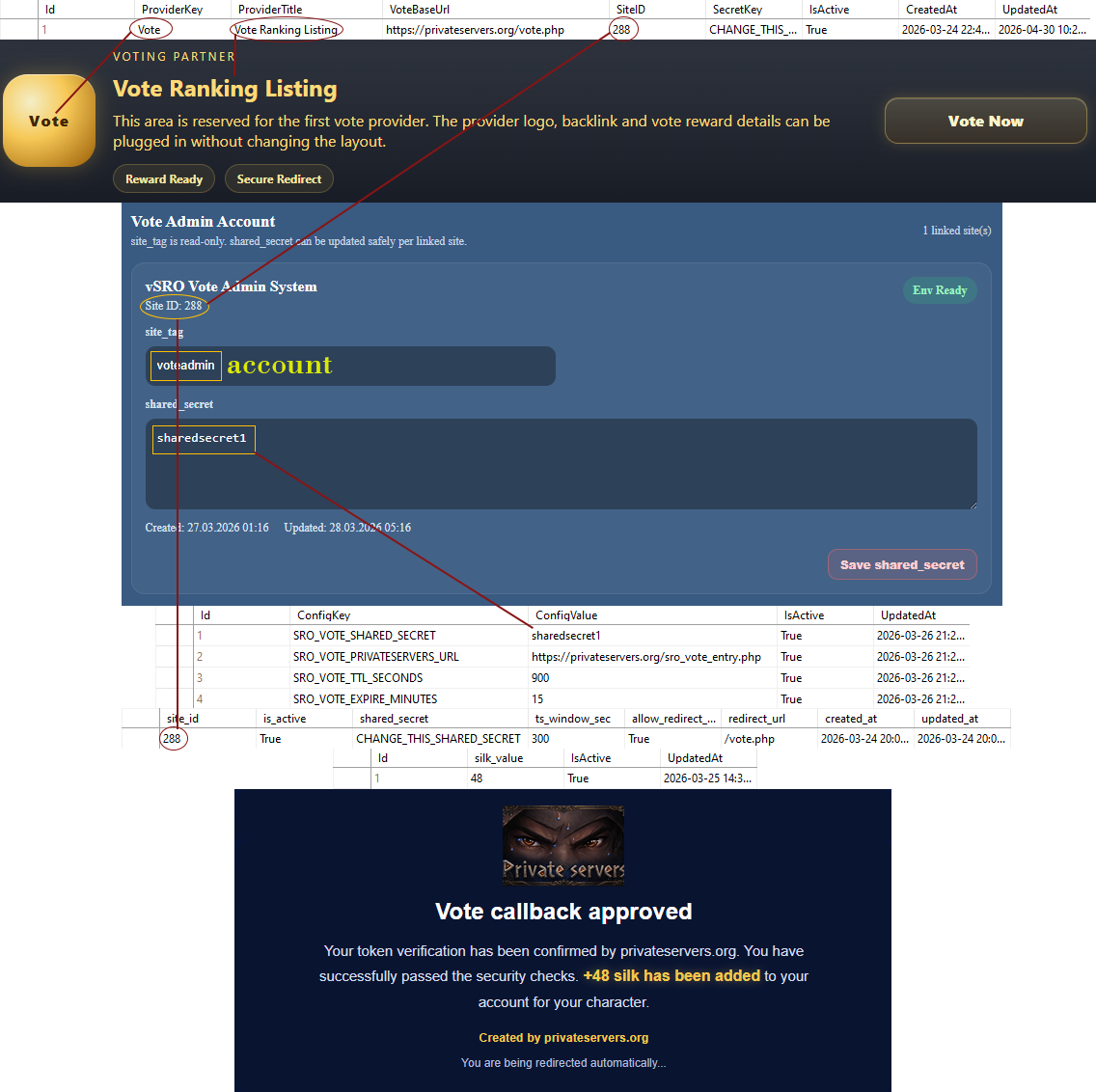
The vote.php page is not just a simple design page; it also dynamically generates the interface by reading the active vote provider from the database. The source table used here is the sro_vote_provider table. The sro_vote_provider_row(...) function within vote.php clearly demonstrates this. This function retrieves the ProviderKey, ProviderTitle, VoteBaseUrl, SiteID, and IsActive fields from the database. Therefore, the vote card we see on the screen is directly linked to this table.
ProviderKey represents the small provider field in the interface.
ProviderTitle represents the title section in the interface.
VoteBaseUrl determines the address the user will be redirected to when they click Vote Now.
This address should be https://privateservers.org/vote.php.
SiteID is the user's own server ID on privateservers.org.
SecretKey should be the same as here CHANGE_THIS_SRO_VOTE_SECRET
IsActive determines whether the record is active.
sro_vote_provider (1)

sro_vote_site_map (2)

sro_vote_silk_price (3)

sro_vote_env_user (4)

The first
4 database tables
require manual data loading when you add them to your database.
Other
3 database tables
are responsible for logging and security, create them directly and do not attempt to add data to them.